Showing posts with label Struts. Show all posts

Thursday, January 18, 2007

Struts Interview Questions

Struts Interview Questions

Question21: What are the disadvantages of Struts?
Answer: Struts is very robust framework and is being used extensively in the industry. But there are some disadvantages of the Struts:
a) High Learning Curve
Struts requires lot of efforts to learn and master it. For any small project less experience developers could spend more time on learning the Struts.

b) Harder to learn
Struts are harder to learn, benchmark and optimize.

Question22: What is Struts Flow?
Answer: Struts Flow is a port of Cocoon's Control Flow to Struts to allow complex workflow, like multi-form wizards, to be easily implemented using continuations-capable JavaScript. It provides the ability to describe the order of Web pages that have to be sent to the client, at any given point in time in an application. The code is based on a proof-of-concept Dave Johnson put together to show how the Control Flow could be extracted from Cocoon. (Ref: http://struts.sourceforge.net/struts-flow/index.html )

Question23: What are the difference between <bean:message> and <bean:write>?
Answer: <bean:message>: This tag is used to output locale-specific text (from the properties files) from a MessageResources bundle.

<bean:write>: This tag is used to output property values from a bean. <bean:write> is a commonly used tag which enables the programmers to easily present the data.

Question24: What is LookupDispatchAction?
Answer: An abstract Action that dispatches to the subclass mapped execute method. This is useful in cases where an HTML form has multiple submit buttons with the same name. The button name is specified by the parameter property of the corresponding ActionMapping. (Ref. http://struts.apache.org/1.2.7/api/org/apache/struts/actions/LookupDispatchAction.html).

Question25: What are the components of Struts?
Answer: Struts is based on the MVC design pattern. Struts components can be categories into Model, View and Controller.
Model: Components like business logic / business processes and data are the part of Model.
View: JSP, HTML etc. are part of View
Controller: Action Servlet of Struts is part of Controller components which works as front controller to handle all the requests.


Question26: What are Tag Libraries provided with Struts?
Answer: Struts provides a number of tag libraries that helps to create view components easily. These tag libraries are:
a) Bean Tags: Bean Tags are used to access the beans and their properties.
b) HTML Tags: HTML Tags provides tags for creating the view components like forms, buttons, etc..
c) Logic Tags: Logic Tags provides presentation logics that eliminate the need for scriptlets.
d) Nested Tags: Nested Tags helps to work with the nested context.

Question27: What are the core classes of the Struts Framework?
Answer:
Core classes of Struts Framework are ActionForm, Action, ActionMapping, ActionForward, ActionServlet etc.

Question28: What are difference between ActionErrors and ActionMessage?
Answer: ActionMessage: A class that encapsulates messages. Messages can be either global or they are specific to a particular bean property.
Each individual message is described by an ActionMessage object, which contains a message key (to be looked up in an appropriate message resources database), and up to four placeholder arguments used for parametric substitution in the resulting message.

ActionErrors: A class that encapsulates the error messages being reported by the validate() method of an ActionForm. Validation errors are either global to the entire ActionForm bean they are associated with, or they are specific to a particular bean property (and, therefore, a particular input field on the corresponding form).

Question29: How you will handle exceptions in Struts?
Answer: In Struts you can handle the exceptions in two ways:
a) Declarative Exception Handling: You can either define global exception handling tags in your struts-config.xml or define the exception handling tags within <action>..</action> tag.
Example:

<exception

key="database.error.duplicate"

path="/UserExists.jsp"

type="mybank.account.DuplicateUserException"/>

b) Programmatic Exception Handling: Here you can use try{}catch{} block to handle the exception.


Question30: What do you understand by JSP Actions?
Answer: JSP actions are XML tags that direct the server to use existing components or control the behavior of the JSP engine. JSP Actions consist of a typical (XML-based) prefix of "jsp" followed by a colon, followed by the action name followed by one or more attribute parameters.
There are six JSP Actions:

<jsp:include/>

<jsp:forward/>

<jsp:plugin/>

<jsp:usebean/>

<jsp:setProperty/>

<jsp:getProperty/>


Source : www.javabeat.net

Struts Interview Questions

Struts Interview Questions

Question11: Why cant we overide create method in StatelessSessionBean?
Answer:
From the EJB Spec : - A Session bean's home interface defines one or morecreate(...) methods. Each create method must be named create and must match one of the ejbCreate methods defined in the enterprise Bean class. The return type of a create method must be the enterprise Bean's remote interface type. The home interface of a stateless session bean must have one create method that takes no arguments.

Question12: Is struts threadsafe?Give an example?
Answer:
Struts is not only thread-safe but thread-dependant. The response to a request is handled by a light-weight Action object, rather than an individual servlet. Struts instantiates each Action class once, and allows other requests to be threaded through the original object. This core strategy conserves resources and provides the best possible throughput. A properly-designed application will exploit this further by routing related operations through a single Action.

Question13: Can we Serialize static variable?
Answer:
Serialization is the process of converting a set of object instances that contain references to each other into a linear stream of bytes, which can then be sent through a socket, stored to a file, or simply manipulated as a stream of data. Serialization is the mechanism used by RMI to pass objects between JVMs, either as arguments in a method invocation from a client to a server or as return values from a method invocation. In the first section of this book, There are three exceptions in which serialization doesnot necessarily read and write to the stream. These are
1. Serialization ignores static fields, because they are not part of any particular object's state.
2. Base class fields are only handled if the base class itself is serializable.
3. Transient fields. There are four basic things you must do when you are making a class serializable. They are:

  1. Implement the Serializable interface.
  2. Make sure that instance-level, locally defined state is serialized properly.
  3. Make sure that superclass state is serialized properly.
  4. Override equals( )and hashCode( ).
    it is possible to have control over serialization process. The class should implement Externalizable interface. This interface contains two methods namely readExternal and writeExternal. You should implement these methods and write the logic for customizing the serialization process .... (Source: http://www.oreilly.com/catalog/javarmi/chapter/ch10.html)
Question14: What are the uses of tiles-def.xml file, resourcebundle.properties file, validation.xml file?
Answer:
tiles-def.xml is is an xml file used to configure tiles with the struts application. You can define the layout / header / footer / body content for your View. See more at http://www.roseindia.net/struts/using-tiles-defs-xml.shtml.

The
resourcebundle.properties file is used to configure the message (error/ other messages) for the struts applications.

The file validation.xml is used to declare sets of validations that should be applied to Form Beans. Fpr more information please visit http://www.roseindia.net/struts/address_struts_validator.shtml.

Question15: What is the difference between perform() and execute() methods?
Answer:
Perform method is the method which was deprecated in the Struts Version 1.1.
In Struts 1.x, Action.perform() is the method called by the ActionServlet. This is typically where your business logic resides, or at least the flow control to your JavaBeans and EJBs that handle your business logic. As we already mentioned, to support declarative exception handling, the method signature changed in perform. Now execute just throws Exception. Action.perform() is now deprecated; however, the Struts v1.1 ActionServlet is smart enough to know whether or not it should call perform or execute in the Action, depending on which one is available.

Question16: What are the various Struts tag libraries?
Answer:
Struts is very rich framework and it provides very good and user friendly way to develop web application forms. Struts provide many tag libraries to ease the development of web applications. These tag libraries are:
* Bean tag library - Tags for accessing JavaBeans and their properties.
* HTML tag library - Tags to output standard HTML, including forms, text boxes, checkboxes, radio buttons etc..
* Logic tag library - Tags for generating conditional output, iteration capabilities and flow management
* Tiles or Template tag library - For the application using tiles
* Nested tag library - For using the nested beans in the application


Question17: What do you understand by DispatchAction?
Answer:
DispatchAction is an action that comes with Struts 1.1 or later, that lets you combine Struts actions into one class, each with their own method. The org.apache.struts.action.DispatchAction class allows multiple operation to mapped to the different functions in the same Action class.
For example:
A package might include separate RegCreate, RegSave, and RegDelete Actions, which just perform different operations on the same RegBean object. Since all of these operations are usually handled by the same JSP page, it would be handy to also have them handled by the same Struts Action.

A very simple way to do this is to have the submit button modify a field in the form which indicates which operation to perform.

<html:hidden property="dispatch" value="error"/>
<SCRIPT>function set(target) {document.forms[0].dispatch.value=target;}</SCRIPT>
<html:submit onclick="set('save');">SAVE</html:submit>
<html:submit onclick="set('create');">SAVE AS NEW</html:submitl>
<html:submit onclick="set('delete);">DELETE</html:submit>

Then, in the Action you can setup different methods to handle the different operations, and branch to one or the other depending on which value is passed in the dispatch field.

String dispatch = myForm.getDispatch();
if ("create".equals(dispatch)) { ...
if ("save".equals(dispatch)) { ...

The Struts Dispatch Action [org.apache.struts.actions] is designed to do exactly the same thing, but without messy branching logic. The base perform method will check a dispatch field for you, and invoke the indicated method. The only catch is that the dispatch methods must use the same signature as perform. This is a very modest requirement, since in practice you usually end up doing that anyway.

To convert an Action that was switching on a dispatch field to a DispatchAction, you simply need to create methods like this

public ActionForward create(
ActionMapping mapping,
ActionForm form,
HttpServletRequest request,
HttpServletResponse response)
throws IOException, ServletException { ...

public ActionForward save(
ActionMapping mapping,
ActionForm form,
HttpServletRequest request,
HttpServletResponse response)
throws IOException, ServletException { ...

Cool. But do you have to use a property named dispatch? No, you don't. The only other step is to specify the name of of the dispatch property as the "parameter" property of the action-mapping. So a mapping for our example might look like this:

<action
path="/reg/dispatch"
type="app.reg.RegDispatch"
name="regForm"
scope="request"
validate="true"
parameter="dispatch"/>

If you wanted to use the property "o" instead, as in o=create, you would change the mapping to

<action
path="/reg/dispatch"
type="app.reg.RegDispatch"
name="regForm"
scope="request"
validate="true"
parameter="o"/>

Again, very cool. But why use a JavaScript button in the first place? Why not use several buttons named "dispatch" and use a different value for each?

You can, but the value of the button is also its label. This means if the page designers want to label the button something different, they have to coordinate the Action programmer. Localization becomes virtually impossible. (Source: http://husted.com/struts/tips/002.html).

Question18: How Struts relates to J2EE?
Answer:
Struts framework is built on J2EE technologies (JSP, Servlet, Taglibs), but it is itself not part of the J2EE standard.

Question19: What is Struts actions and action mappings?
Answer:
A Struts action is an instance of a subclass of an Action class, which implements a portion of a Web application and whose perform or execute method returns a forward.

An action can perform tasks such as validating a user name and password.

An action mapping is a configuration file entry that, in general, associates an action name with an action. An action mapping can contain a reference to a form bean that the action can use, and can additionally define a list of local forwards that is visible only to this action.

An action servlet is a servlet that is started by the servlet container of a Web server to process a request that invokes an action. The servlet receives a forward from the action and asks the servlet container to pass the request to the forward's URL. An action servlet must be an instance of an org.apache.struts.action.ActionServlet class or of a subclass of that class. An action servlet is the primary component of the controller.

Question20: Can I setup Apache Struts to use multiple configuration files?
Answer: Yes Struts can use multiple configuration files. Here is the configuration example:
<servlet>
<servlet-name>banking</servlet-name>
<servlet-class>org.apache.struts.action.ActionServlet
</servlet-class>
<init-param>
<param-name>config</param-name>
<param-value>/WEB-INF/struts-config.xml,
/WEB-INF/struts-authentication.xml,
/WEB-INF/struts-help.xml
</param-value>
</init-param>
<load-on-startup>1</load-on-startup>
</servlet>

Source : www.javabeat.net

Struts Interview Questions

Struts Interview Questions

Q1: What is ActionServlet?
A: The class org.apache.struts.action.ActionServlet is the called the ActionServlet. In the the Jakarta Struts Framework this class plays the role of controller. All the requests to the server goes through the controller. Controller is responsible for handling all the requests.

Q2: How you will make available any Message Resources Definitions file to the Struts Framework Environment?
A:
Message Resources Definitions file are simple .properties files and these files contains the messages that can be used in the struts project. Message Resources Definitions files can be added to the struts-config.xml file through <message-resources /> tag.
Example:
<message-resources parameter="MessageResources" />

Q3: What is Action Class?
A:
The Action is part of the controller. The purpose of Action Class is to translate the HttpServletRequest to the business logic. To use the Action, we need to Subclass and overwrite the execute() method. The ActionServlet (commad) passes the parameterized class to Action Form using the execute() method. There should be no database interactions in the action. The action should receive the request, call business objects (which then handle database, or interface with J2EE, etc) and then determine where to go next. Even better, the business objects could be handed to the action at runtime (IoC style) thus removing any dependencies on the model. The return type of the execute method is ActionForward which is used by the Struts Framework to forward the request to the file as per the value of the returned ActionForward object.

Q4: Write code of any Action Class?
A:
Here is the code of Action Class that returns the ActionForward object.
TestAction.java
package roseindia.net;

import javax.servlet.http.HttpServletRequest;
import javax.servlet.http.HttpServletResponse;

import org.apache.struts.action.Action;
import org.apache.struts.action.ActionForm;
import org.apache.struts.action.ActionForward;
import org.apache.struts.action.ActionMapping;

public class TestAction extends Action
{
public ActionForward execute(
ActionMapping mapping,
ActionForm form,
HttpServletRequest request,
HttpServletResponse response) throws Exception{
return mapping.findForward("testAction");
}
}

Q5: What is ActionForm?
A:
An ActionForm is a JavaBean that extends org.apache.struts.action.ActionForm. ActionForm maintains the session state for web application and the ActionForm object is automatically populated on the server side with data entered from a form on the client side.

Q6: What is Struts Validator Framework?
A:
Struts Framework provides the functionality to validate the form data. It can be use to validate the data on the users browser as well as on the server side. Struts Framework emits the java scripts and it can be used validate the form data on the client browser. Server side validation of form can be accomplished by sub classing your From Bean with DynaValidatorForm class.

The Validator framework was developed by David Winterfeldt as third-party add-on to Struts. Now the Validator framework is a part of Jakarta Commons project and it can be used with or without Struts. The Validator framework comes integrated with the Struts Framework and can be used without doing any extra settings.

Q7. Give the Details of XML files used in Validator Framework?
A:
The Validator Framework uses two XML configuration files validator-rules.xml and validation.xml. The validator-rules.xml defines the standard validation routines, these are reusable and used in validation.xml. to define the form specific validations. The validation.xml defines the validations applied to a form bean.

Q8. How you will display validation fail errors on jsp page?
A:
Following tag displays all the errors:
<html:errors/>

Q9. How you will enable front-end validation based on the xml in validation.xml?
A:
The <html:javascript> tag to allow front-end validation based on the xml in validation.xml. For example the code: <html:javascript formName="logonForm" dynamicJavascript="true" staticJavascript="true" /> generates the client side java script for the form "logonForm" as defined in the validation.xml file. The <html:javascript> when added in the jsp file generates the client site validation script.

Question10: What is RequestProcessor and RequestDispatcher?
Answer:
The controller is responsible for intercepting and translating user input into actions to be performed by the model. The controller is responsible for selecting the next view based on user input and the outcome of model operations. The Controller receives the request from the browser, invoke a business operation and coordinating the view to return to the client.

The controller is implemented by a java servlet, this servlet is centralized point of control for the web application. In struts framework the controller responsibilities are implemented by several different components like
The ActionServlet Class
The RequestProcessor Class
The Action Class


The ActionServlet extends the javax.servlet.http.httpServlet class. The ActionServlet class is not abstract and therefore can be used as a concrete controller by your application.
The controller is implemented by the ActionServlet class. All incoming requests are mapped to the central controller in the deployment descriptor as follows.
<servlet>
<servlet-name>action</servlet-name>
<servlet-class>org.apache.struts.action.ActionServlet</servlet-class>
</servlet>


All request URIs with the pattern *.do are mapped to this servlet in the deployment descriptor as follows.

<servlet-mapping>
<servlet-name>action</servlet-name>
<url-pattern>*.do</url-pattern>

A request URI that matches this pattern will have the following form.
http://www.my_site_name.com/mycontext/actionName.do

The preceding mapping is called extension mapping, however, you can also specify path mapping where a pattern ends with /* as shown below.
<servlet-mapping>
<servlet-name>action</servlet-name>
<url-pattern>/do/*</url-pattern>
<url-pattern>*.do</url-pattern>

A request URI that matches this pattern will have the following form.
http://www.my_site_name.com/mycontext/do/action_Name
The class org.apache.struts.action.requestProcessor process the request from the controller. You can sublass the RequestProcessor with your own version and modify how the request is processed.

Once the controller receives a client request, it delegates the handling of the request to a helper class. This helper knows how to execute the business operation associated with the requested action. In the Struts framework this helper class is descended of org.apache.struts.action.Action class. It acts as a bridge between a client-side user action and business operation. The Action class decouples the client request from the business model. This decoupling allows for more than one-to-one mapping between the user request and an action. The Action class also can perform other functions such as authorization, logging before invoking business operation. the Struts Action class contains several methods, but most important method is the execute() method.
public ActionForward execute(ActionMapping mapping,
ActionForm form, HttpServletRequest request, HttpServletResponse response) throws Exception;

The execute() method is called by the controller when a request is received from a client. The controller creates an instance of the Action class if one doesn’t already exist. The strut framework will create only a single instance of each Action class in your application.

Action are mapped in the struts configuration file and this configuration is loaded into memory at startup and made available to the framework at runtime. Each Action element is represented in memory by an instance of the org.apache.struts.action.ActionMapping class . The ActionMapping object contains a path attribute that is matched against a portion of the URI of the incoming request.
<action>
path= "/somerequest"
type="com.somepackage.someAction"
scope="request"
name="someForm"
validate="true"
input="somejsp.jsp"
<forward name="Success" path="/action/xys" redirect="true"/>
<forward name="Failure" path="/somejsp.jsp" redirect="true"/>
</action>

Once this is done the controller should determine which view to return to the client. The execute method signature in Action class has a return type org.apache.struts.action.ActionForward class. The ActionForward class represents a destination to which the controller may send control once an action has completed. Instead of specifying an actual JSP page in the code, you can declaratively associate as action forward through out the application. The action forward are specified in the configuration file.
<action>
path= "/somerequest"
type="com.somepackage.someAction"
scope="request"
name="someForm"
validate="true"
input="somejsp.jsp"
<forward name="Success" path="/action/xys" redirect="true"/>
<forward name="Failure" path="/somejsp.jsp" redirect="true"/>
</action>

The action forward mappings also can be specified in a global section, independent of any specific action mapping.
<global-forwards>
<forward name="Success" path="/action/somejsp.jsp" />
<forward name="Failure" path="/someotherjsp.jsp" />
</global-forwards>


public interface RequestDispatcher

Defines an object that receives requests from the client and sends them to any resource (such as a servlet, HTML file, or JSP file) on the server. The servlet container creates the RequestDispatcher object, which is used as a wrapper around a server resource located at a particular path or given by a particular name.
This interface is intended to wrap servlets, but a servlet container can create RequestDispatcher objects to wrap any type of resource.

getRequestDispatcher

public RequestDispatcher getRequestDispatcher(java.lang.String path)

Returns a RequestDispatcher object that acts as a wrapper for the resource located at the given path. A RequestDispatcher object can be used to forward a request to the resource or to include the resource in a response. The resource can be dynamic or static.
The pathname must begin with a "/" and is interpreted as relative to the current context root. Use getContext to obtain a RequestDispatcher for resources in foreign contexts. This method returns null if the ServletContext cannot return a RequestDispatcher.

Parameters:
path - a String specifying the pathname to the resource
Returns:
a RequestDispatcher object that acts as a wrapper for the resource at the specified path
See Also:
RequestDispatcher, getContext(java.lang.String)


getNamedDispatcher

public RequestDispatcher getNamedDispatcher(java.lang.String name)

Returns a RequestDispatcher object that acts as a wrapper for the named servlet.
Servlets (and JSP pages also) may be given names via server administration or via a web application deployment descriptor. A servlet instance can determine its name using ServletConfig.getServletName().
This method returns null if the ServletContext cannot return a RequestDispatcher for any reason.

Parameters:
name - a String specifying the name of a servlet to wrap
Returns:
a RequestDispatcher object that acts as a wrapper for the named servlet
See Also:
RequestDispatcher, getContext(java.lang.String), ServletConfig.getServletName()

Source : www.javabeat.net

Tuesday, October 31, 2006

Struts from Scratch

This article lays out the steps for installing Struts and a basic "Hello World!" sample application 'from scratch.' It assumes that you are brand new to Struts and that you're also fairly new to Java ServerPages (JSP) and programming in general.

The goal of this article is to go through the basics of installing and building a Struts application; the details of the application itself are not covered. The application is taken from my recent book, Struts Kick Start, and is covered in detail there. The application and build files described in this article can be downloaded from the book's companion Web site (http://www.strutskickstart.com).

Although some of the material in this article may seem very basic to an experienced Java developer, I've had a number of people express frustration to me that they were unable to locate a set of very basic instructions for installing Struts and getting a beginning application running. This is the problem addressed by this article.

Before we begin, it's worth stating that Struts does require some knowledge of Java and JSP to be used effectively. If you are brand new to Java Programming or JSP, it's recommended that you get some base knowledge of those technologies before diving too deeply into Struts. Spending a little extra time preparing yourself will make learning Struts a lot less frustrating for you.
Preparing your Computer to Install Struts

Before you install Struts, there are some configuration steps that need to be completed on your machine. This section leads you through those steps and gets you ready to install and begin working with Struts.

While this article assumes you have a computer running one of the Microsoft Windows operating systems, modifying the steps to work under Linux (or some other Unix variant) would require only minor changes.

Installing Java

Struts is based on Java, so running it requires you have Java installed. This article uses Sun's Java 2 Platform Standard Edition v1.4.1 (also known as JDK 1.4.1). The JDK 1.4.1 can be downloaded free from Sun's Web site at http://java.sun.com/j2se/1.4.1/index.html. Earlier versions of Sun's JDK can be used, but 1.4.1 is the most current version.

If you've done any programming in Java, it's likely that you already have this (or some other) version of Java installed. To see if you have Java installed already (or to see what version you have), from a command line, simply type "java -version". The output from this command run on my computer is as follows:

// Testing your Java Installation.

c:\dev>java -version
java version "1.4.1_01"
Java(TM) 2 Runtime Environment, Standard Edition
(build 1.4.1_01-b01)
Java HotSpot(TM) Client VM (build 1.4.1_01-b01, mixed mode)

If running this command doesn't show that you have a version of Java installed, you need to install a JDK on your computer before you can install Struts. Installing the JDK is like installing any other application on your machine. I'd recommend just following the defaults unless you have specific reasons not to. You can download the JDK from the link above.

Once Java is installed, you need to ensure that you have two environment settings configured. They are:

* Set JAVA_HOME to point to the top level directory where your JDK is installed. On my machine, I installed the JDK 1.4.1 in the directory C:\j2sdk1.4.1_01 so that's the value I would use as my JAVA_HOME.
* Add JAVA_HOME\bin to your path so that you can execute the java program itself. In my case this means adding the directory c:\j2sdk1.4.1_01\bin to my PATH variable.

Because each version of Windows (or Unix shell) provides a slightly different way of setting environment variables, you'll have to refer to other documentation to determine how to do this for your environment. After you've completed these steps, you should be able to open a new window, type the java -version command and see output similar to the example above.
Installing Ant So You Can Build Web Archive (WAR) Files

Once you've verified that you have Java installed correctly, the next thing you need do is install Ant. Ant is a program used to compile, build, and deploy Java programs. It, like Struts, is an open source program from the Apache Software Foundation. Ant is widely used by Java developers for all kinds of tasks related to building, testing, and deploying Java applications. Ant is available for free from the the Apache Ant Project's Web site at http://ant.apache.org/.

You need to have Ant installed because there is more to running Struts programs than simply compiling your java files. Struts applications are stored in what are called Web ARchive files (also called "WAR" files). Ant coordinates the process of taking your Java files, your JSP files, and all the other files that make up a Struts application and using them to build the WAR files that are needed to run the application.

WAR files are defined as part of the Java 2 Enterprise Edition (J2EE) standard. This is the same standard that defines the operation of Tomcat (and other servlet engines). Among the other Java technologies defined by the J2EE standard are Enterprise Java Beans (EJBs), the Java Message Service (JMS), and Java Mail. Using JSP and WAR files is a great way to get introduced to the J2EE standard.

Installing Ant is required to take advantage of the automated build scripts provided for the sample application. If you are currently a Java developer, you likely have Ant already installed. If you don't have it installed, this section provides the steps you need to follow to install it.

Similar to verifying your Java installation, you can verify your Ant install by typing the command ant -version. The results of running this command on my computer are shown below:

// Testing your Ant Installation.

c:\dev>ant -version
Apache Ant version 1.5.1 compiled on October 2 2002


To install Ant, simply download its binary files from http://ant.apache.org and unzip the downloaded file into a convenient directory. For myself, I installed Ant into a directory named C:\jakarta-ant-1.5, but then renamed the directory to C:\ant to keep things simple.

Similar to installing Java, you now need to change two environment settings for everything to work. They are:

* Set ANT_HOME to point to the top level directory where Ant is installed. On my machine, this value is C:\ant.
* Add ANT_HOME\bin to your path so that you can execute the Ant program itself. In my case, this means adding the directory C:\ant\bin to my PATH variable.

To verify your installation, you can type ant -version to verify that Ant will run. The output should be similar to what you see in the section above. Now Ant should be installed and configured correctly and we're ready to install the Apache Tomcat server.
Installing Tomcat

Apache Tomcat is referred to as a "Servlet Engine" or "Servlet Container." This means that it conforms to the standards defined for running applications based on Java Servlets and Java ServerPages. (In fact, Tomcat is the 'Reference Implementation' of these standards.) Because Struts is based on Java Servlet and Java ServerPages technologies, you need a servlet container for your Struts applications to run.

There are a great number of other servlet containers available including Weblogic, Websphere, Resin, and many more. We're using Tomcat because it is widely available and easy to find and install. If you need Tomcat, you can download a copy of it from the Apache Jakarta Project at http://jakarta.apache.org/tomcat.

There are a number of ways to install Tomcat. We will install using the Win32 installation file jakarta-tomcat-4.1.12.exe. This install uses an installshield-like installer from nullsoft. The only change to the default installation I'd recommend is overriding the installation location to some path that does not contain spaces (I used \dev\tomcat). I've seen situations where having embedded spaces in the path to the Tomcat files can cause problems during the Ant build process.

After you've completed the Tomcat installation, you should be able to start Tomcat and then open a browser on your machine and point it to the location http://localhost:8080/ to see the default Tomcat info page.
Installing Struts

Now that we have all the preliminary work completed, it's finally time to install Struts!

There are two sets of files that make up Struts: The Struts binaries (as they are referred to on the Struts site) and the Struts source files. This section only discusses the binaries because these are what you use to develop Struts applications. If you don't already have a copy of Struts, you can download it via the Jakarta Struts home page at http://jakarta.apache.org/struts. Get the binaries of the latest release of the 1.1 version of Struts.

From the perspective of someone developing applications, the Struts binaries are really just a collection of files. These files (.jar's, .tld's, .properties, and si forth) contain the Struts application files along with configuration information, error messages, and so on.

Installing Struts is really just copying all these files on to your computer in a way that makes it convenient for your application to access them. This is why there's no setup.exe installation file for Struts—all you do is unzip Struts into a directory and start working!

On my computer, I unzipped Struts into the C:\dev\jakarta-struts-1.1-rc1 directory and then renamed it to C:\dev\struts to make it easier to work with. This is all that's required to install Struts.

Compiling and Running the Hello World Example Application

One of the critical factors in being successful as a developer is making sure you have an efficient Edit/Compile/Test process. The goal of this section is to provide a simple and efficient way to get this process organized.

There are many options with regard to the 'editing' part; they range from text editors such as Notepad, vi, and emacs up through powerful IDEs such as JBuilder, IntelliJ, and Eclipse. (Personally, I use Eclipse from http://www.eclipse.org). This article doesn't cover editing options, so let's discuss the build and test parts of the equation in a bit more detail.

The value that Ant provides is that it greatly simplifies the build and test process. Ant uses an XML script to direct all the actions required for compiling the Java files, building the WAR file for you, and then deploying the WAR file into your servlet container. In the case of Tomcat, deploying the WAR file means just copying it into the TOMCAT_HOME\webapps directory (where TOMCAT_HOME represents the top-level directory for your Tomcat installation, for example C:\dev\tomcat).
Getting the Example Application

The example application is available at http://www.strutskickstart.com. It is the Hello World! application. To install it, simply download it and copy it into a convenient directory on your computer.

For this sample application, an Ant script is already written. This Ant script loads the properties it needs to work on a particular computer from a properties file. This properties file contains the directory paths it needs to locate the Tomcat installation on your machine. This file is named build.properties and is shown below:

// The build.properties file.

tomcat.home=c:/dev/tomcat
webapps.home=c:/dev/tomcat/webapps

To modify this file, simply edit it and replace these two values with the appropriate values for your computer.

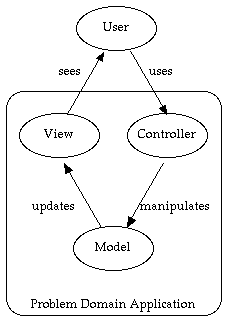
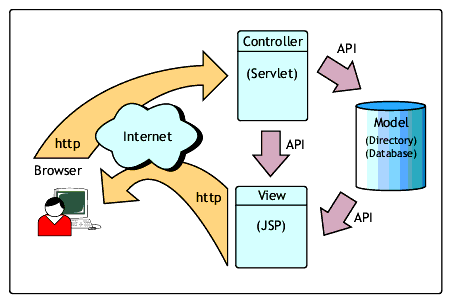
MVC Diagrams


Struts 1.3.5 Released


The Apache Struts team is pleased to announce that Struts 1.3.5 has been promoted to General Availability.Struts 1.3.5 is available in a full distribution, or as separate library, source, example and documentation distributions.More from Apache>>